
Is PeerLLM Worth Your Hardware? Now You Can Find Out Before You Sign Up
Every person who has ever considered hosting on PeerLLM has asked the same two questions, in the same order:
Can my machine even do this? And: is it worth it?
Until this release we had no straight answer to either one. You had to create an account, pay for a subscription, install a host, hand it some disk, and wait a month to find out. That is a lot of commitment to buy an answer, and it is the wrong order to ask somebody to do things in.
Host v2.13.0 answers both questions before you do any of that. No account. No payment. No install, if you don’t want one.
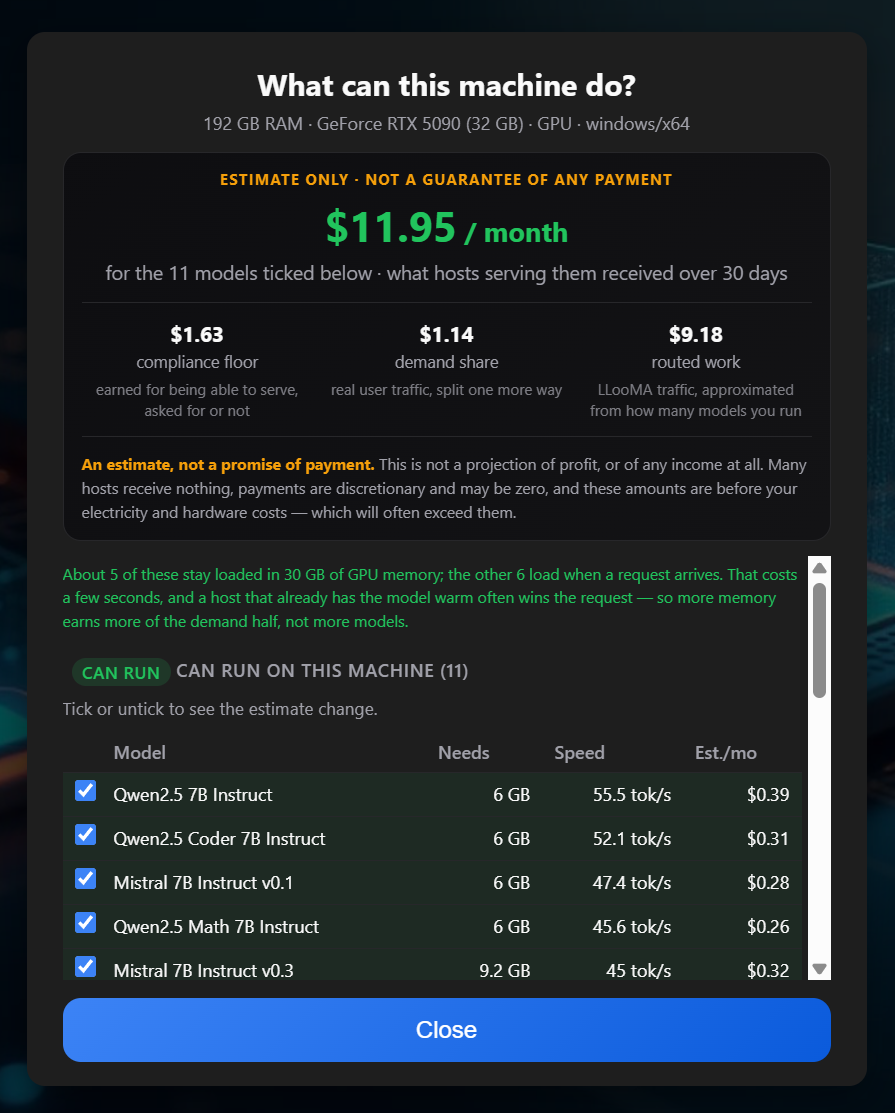
It reads your machine — RAM, GPU, VRAM, platform — weighs every model in the network’s catalogue against it, and tells you three things: what you can run, what you cannot, and what nobody has measured yet. Then it puts a number on it.
Nothing about your machine is stored. Not on your disk, not on our servers. The probe runs, the answer renders, and that is the end of it.
One number, taken apart
Any platform can show you a single encouraging figure. That is marketing, and you should not trust it — including from us.
So the number comes apart into the three things it is actually made of:
The compliance floor. Every host-and-model pair the scheduler trusts gets probed on a cadence, whether or not a single user ever asks for anything — roughly nineteen times a month. You are paid for those. This is the part of hosting most people don’t know exists, and it is the part that does not depend on luck: it is paid for capability, and it scales with how many models your machine can serve.
Demand share. Real user traffic for a given model, divided among the hosts that can serve it — including you, once you join. This is the part that moves.
Routed work. LLooMA 2.0 traffic — agentic work the orchestrator places on whatever models a host already holds, rather than on a model somebody picked by name. On today’s network it is the largest of the three, and it is shown separately precisely because it cannot be attributed to any one model you tick.
Three components, three explanations, shown side by side. If you disagree with one of them, you can see exactly which one you disagree with — which is the whole point of showing them apart.
Your models, your number
The estimate is not a property of your hardware. It is a property of what you choose to serve, so the checklist is live: tick and untick models and the figure moves with them.
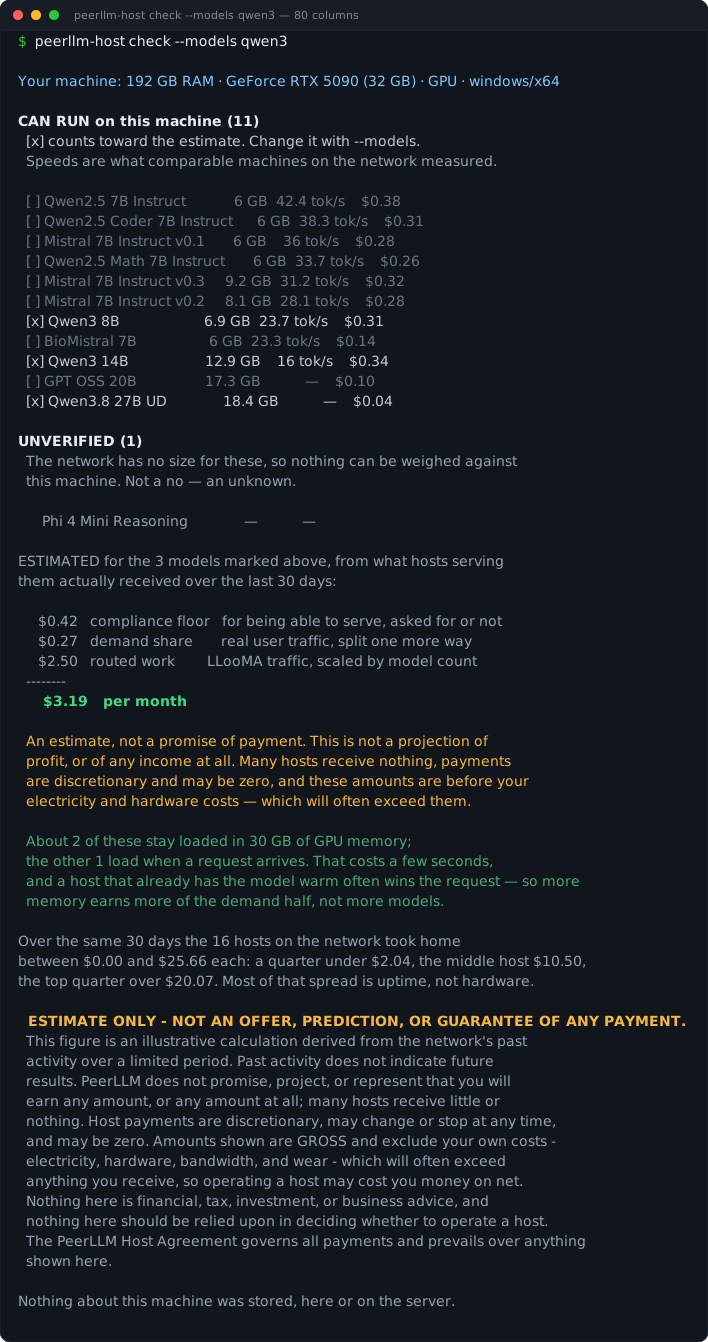
Models are sorted into can run, cannot run, and unverified — that last group being models the network has no size for, so nothing can be weighed against your machine. Not a no. An unknown, labelled as one, rather than quietly counted as a yes.
And if a model cannot run on your machine, it shows no figure at all. A rate is what a host would receive. Printing one next to a model that would never load on your hardware is worse than printing nothing.
Without installing anything
The desktop host has a button for this on its sign-in screen. But you should not have to install a desktop application to ask a question, so the CLI does it in one command:
npm i -g peerllm-host-cli
peerllm-host check
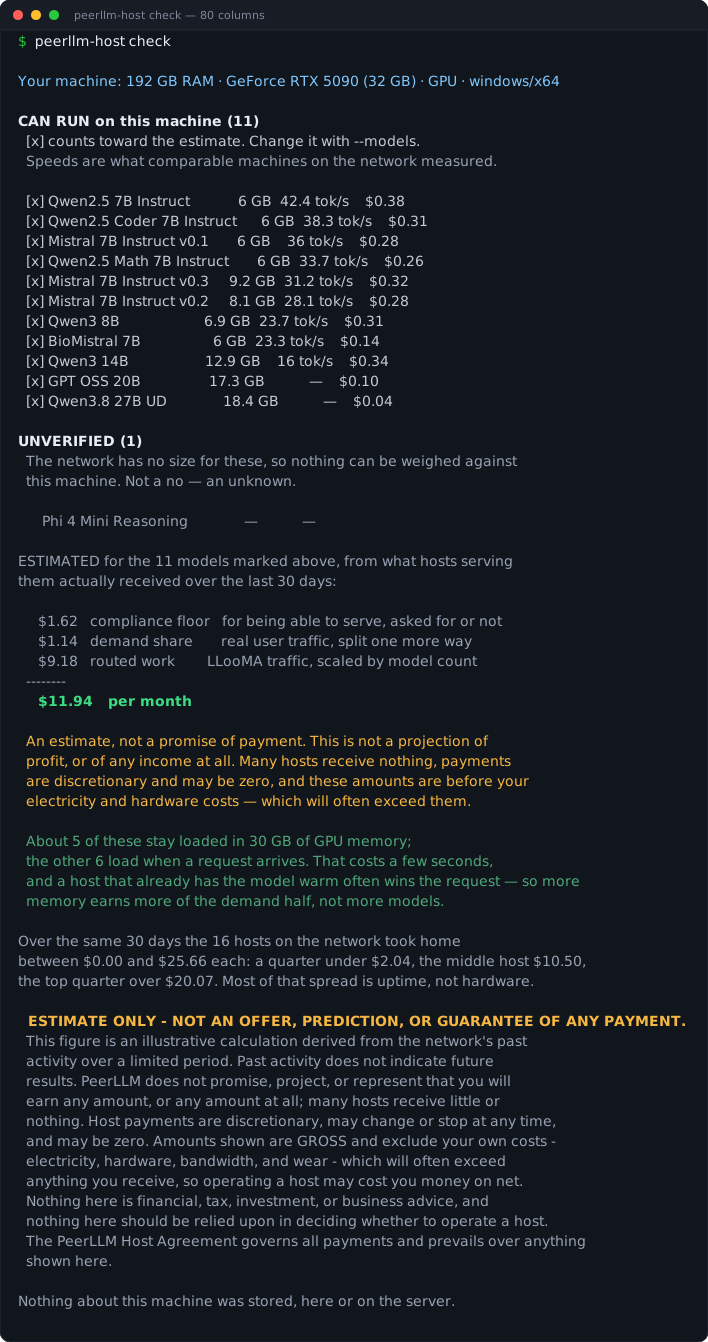
No login, no config, no daemon. It prints what your machine can run, what the network has paid for those models, and what it would be worth to you — then exits.
The speeds it shows are not synthetic benchmarks. They are what comparable machines on the live network actually measured.
The number follows you into every decision
An estimate you see once, before you sign up, is a brochure. It only becomes useful if it is there at the moments you are actually deciding something.
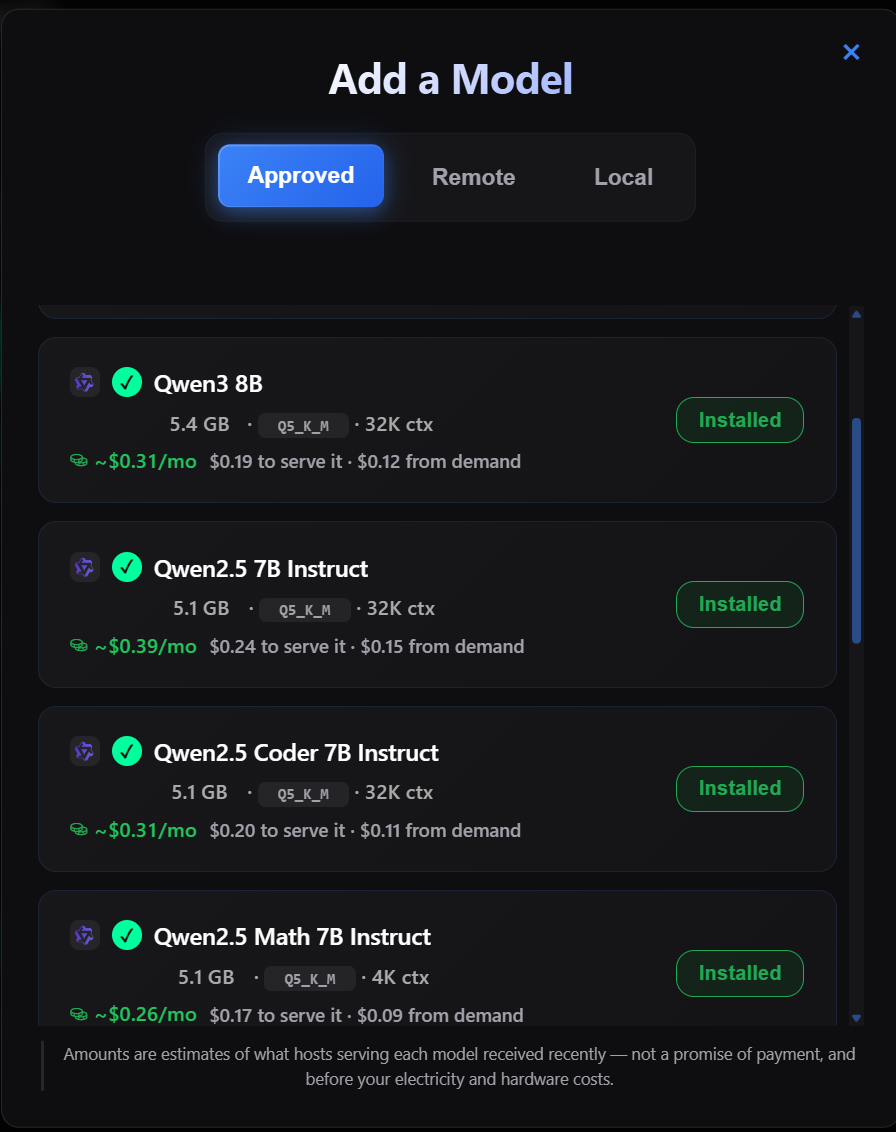
So it is in the approved-model list, where you decide what to add — each model split into the part earned for being able to serve it and the part that comes from real demand:
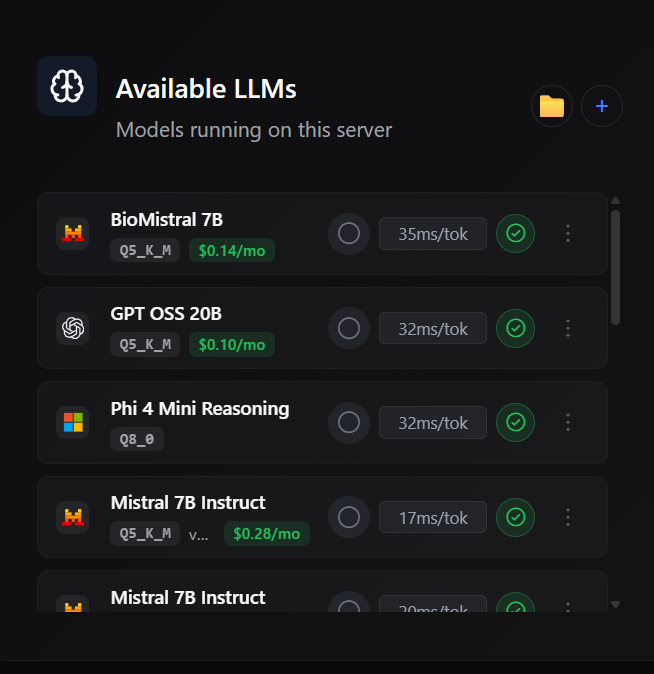
It is on the dashboard, against the models you already hold — which is the harder decision, because dropping a model frees disk you can see and gives up income you cannot:
And it is in the CLI’s live dashboard while your host is running, next to what the network has cleared each model to serve:
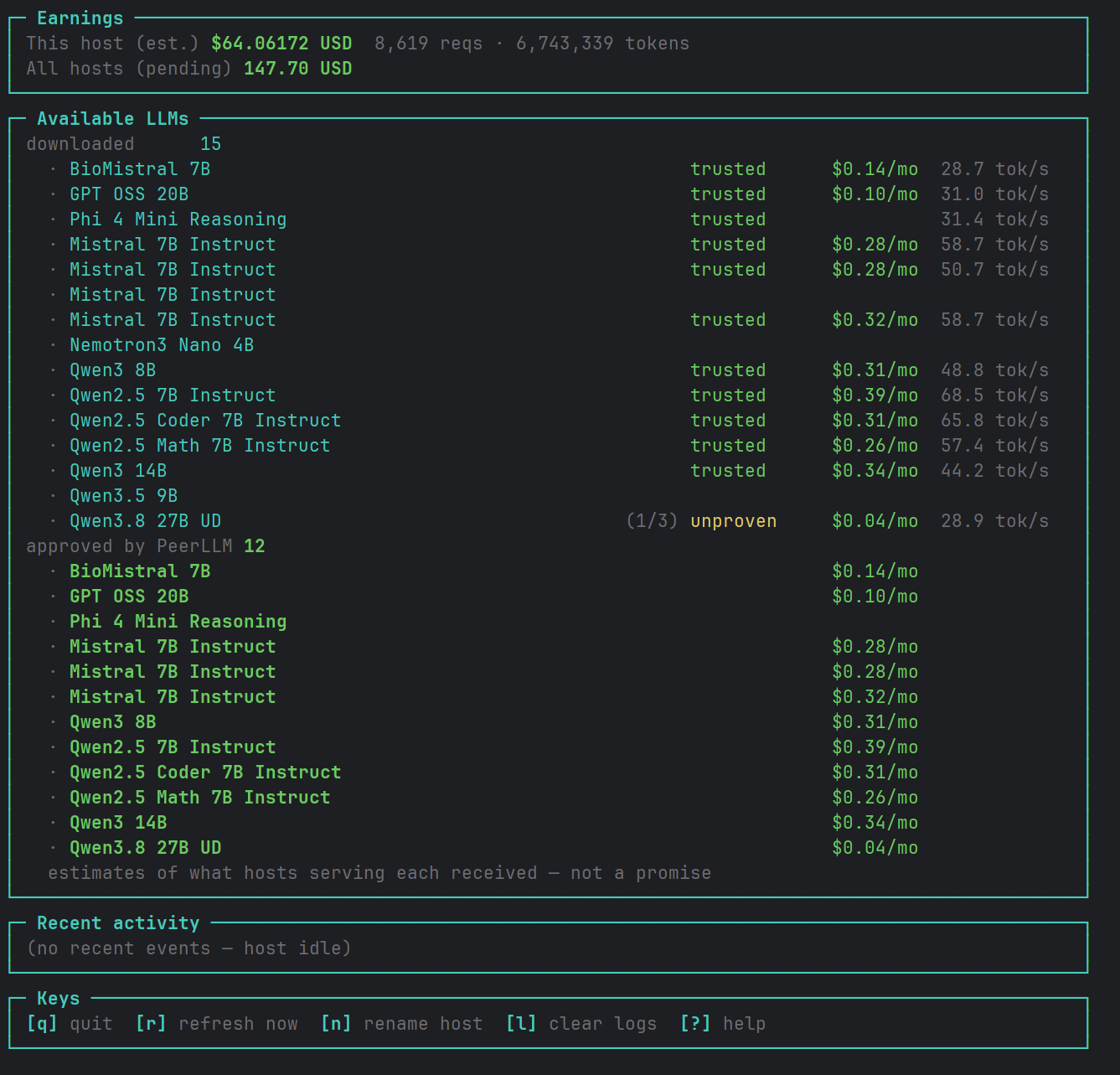
One figure, computed the same way, in all four places. You should never have to wonder whether the number that convinced you to join is the same number you are being measured against later.
Where these numbers come from
They are measured, not modelled.
Payment on this network is one line of arithmetic, and it is the same line for everybody:
(tokens received + tokens served) × $9.50 per million
The estimator reads what hosts serving each model actually received over a rolling thirty-day window — from GET /api/network-health/host-economics, the same endpoint that feeds models.peerllm.com. It does not project, extrapolate a trend, or assume a growth curve. If a model earned nothing for the hosts serving it last month, it shows nothing.
Memory does not cap what you can earn from, either. The network loads and unloads models on demand, so a machine serves far more of the catalogue than it could ever hold at once. What memory changes is how many stay warm — and a warm model tends to win the requests it is offered, because it answers first. The check tells you how many of your selection would stay resident, and explains what that does, instead of silently pretending the rest don’t count.
What it will not tell you
It will not tell you that you are going to make money.
Every figure carries this, above and below, in both clients — not in a footer, not behind a link:
Estimate only — not an offer, prediction, or guarantee of any payment. These figures are illustrative calculations derived from the network’s past activity over a limited period. Past activity does not indicate future results. PeerLLM does not promise, project, or represent that you will earn any amount, or any amount at all; many hosts receive little or nothing. Host payments are discretionary, may change or stop at any time, and may be zero.
Amounts shown are gross and exclude your own costs — electricity, hardware, bandwidth and wear — which will often exceed anything you receive, so operating a host may cost you money on net. Nothing here is financial, tax, investment, or business advice. The PeerLLM Host Agreement governs all payments and prevails over anything shown here.
The check will also tell you plainly when the answer is no — when your machine cannot run anything the network needs, or when what it can run has earned very little. That outcome is a feature. An honest tool that talks some people out of hosting is worth more than an optimistic one that surprises them at the first payout.
Hosting also costs $5.00 USD per month, per machine, and v2.13.0 says so on the registration screen rather than at the payment step. If the estimate does not clear that on your hardware, you should know before you create an account, not after.
Get it
Host v2.13.0 is out now for Windows, macOS (Intel and Apple Silicon), and Linux — desktop and CLI, same version, same numbers.
npm i -g peerllm-host-cli
peerllm-host check
Or download the desktop host from hosts.peerllm.com and press the button on the sign-in screen.
Ask before you commit. That is the whole idea.