
Introducing PeerLLM Models: A Live Profile for Every LLM on the Network
Earlier this month I introduced PeerLLM SKILLs, a portal that proves what a skill does across many models. Today I want to show you the other half of that graph: what a model is, on this network, right now.
It lives at models.peerllm.com (and llms.peerllm.com, same site).
0/ The Question a Model Card Cannot Answer
Every open model arrives with a card. The card tells you the parameter count, the training mix, the benchmark scores, the licence file’s name. It is written once, at publication, by the people who made it.
It cannot tell you the thing you actually need to know before you use one:
- Which machines are holding these weights right now, and can any of them answer me this second?
- How fast will it actually run, on hardware like mine?
- Does it follow instructions, or does it only score well on benchmarks?
- What does the licence let me do, in a product I sell?
Those questions do not have static answers. They have answers that change every few seconds, and they are different for every network the model runs on. A card cannot hold them. So we built something that can.
A model card describes a model at publication. This describes a model in production.
1/ One Rule: A Null Is Never a Zero
Before anything else, the rule that shaped every decision in this thing.
Every figure on the site is a measurement taken from the live network. Where no measurement exists, the site shows an em dash and tells you why it is missing. It never fills the gap with something plausible.
That sounds obvious. It is not how most of this genre works. It is very easy to write a “requirements” page that estimates a memory footprint, models a throughput, and presents both in the same typeface as a number somebody actually recorded. The reader cannot tell them apart, and so all of it becomes untrustworthy.
So: a model nobody has ever timed shows no speed, and says “no machine has ever timed this model”. A model with no traffic this window shows no success rate, and says so. A licence we have not curated says “not yet curated” rather than guessing Apache-2.0 over an unknown set of weights. Being blank is a real answer, and often a more useful one than a confident wrong number.
2/ Hardware: Which Machines, Actually
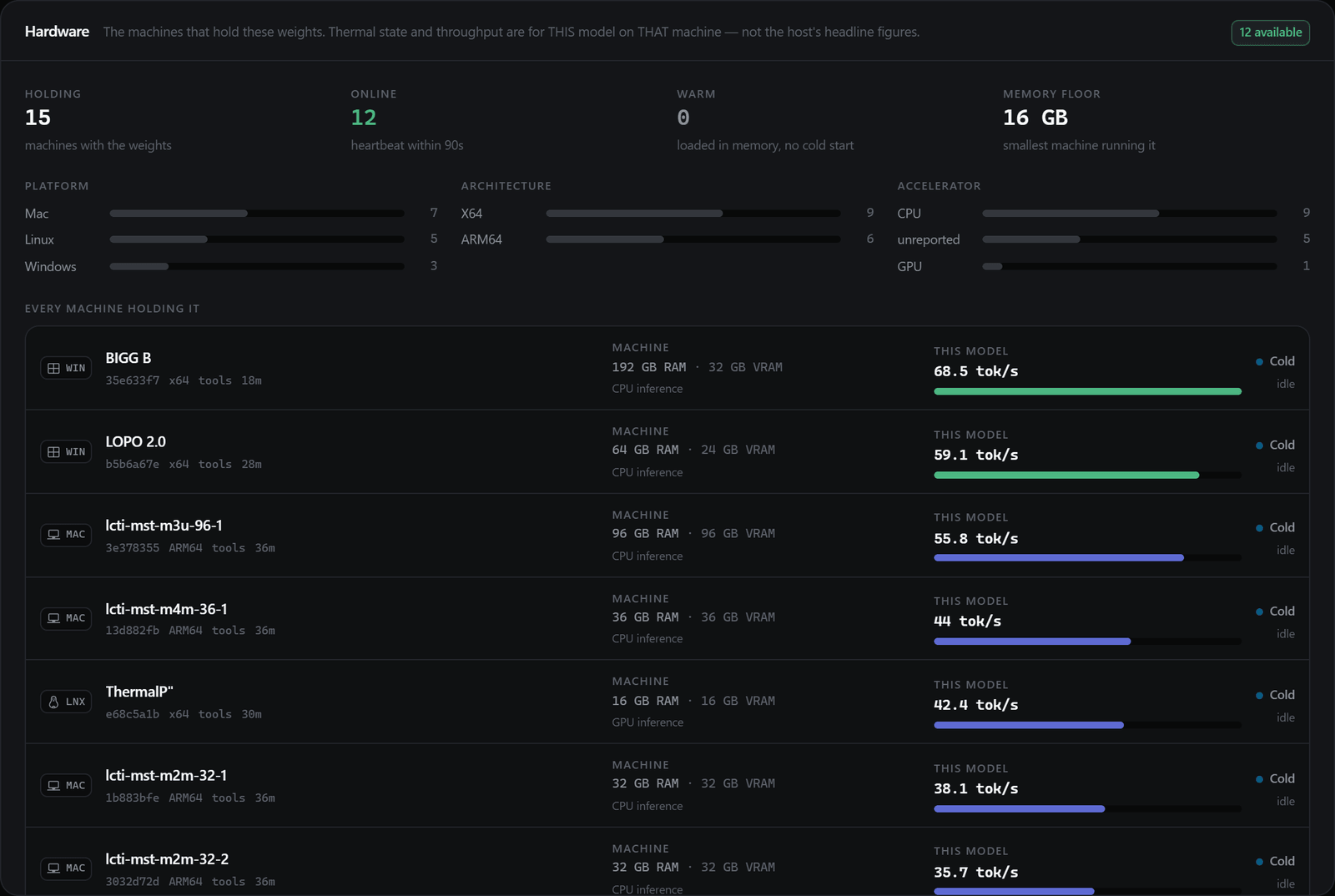
The first panel on any profile is the fleet, filtered to this model.
Not “recommended: 16GB VRAM”. The actual machines: how many hold the weights, how many are online, how many have it warm in memory right now, and the smallest machine on the network currently running it. Then every one of them individually, with its RAM, its accelerator, its uptime, and, critically, its own measured throughput for this model.
That last distinction matters more than it looks. A host’s headline speed describes whatever it happens to be running. What you want is this model, on that machine, which is what the orchestrator records and what we show.
What you see is the host’s public display name, chosen by whoever runs the machine, alongside the same short host id the network observatory shows. Think of it as a gamertag: it identifies a machine on the network, not a person. Account identity, connection ids and billing detail stay on our server and never reach your browser.
3/ Performance: The Number That Averages Destroy
Here is the finding that changed how I think about serving models on a heterogeneous fleet.
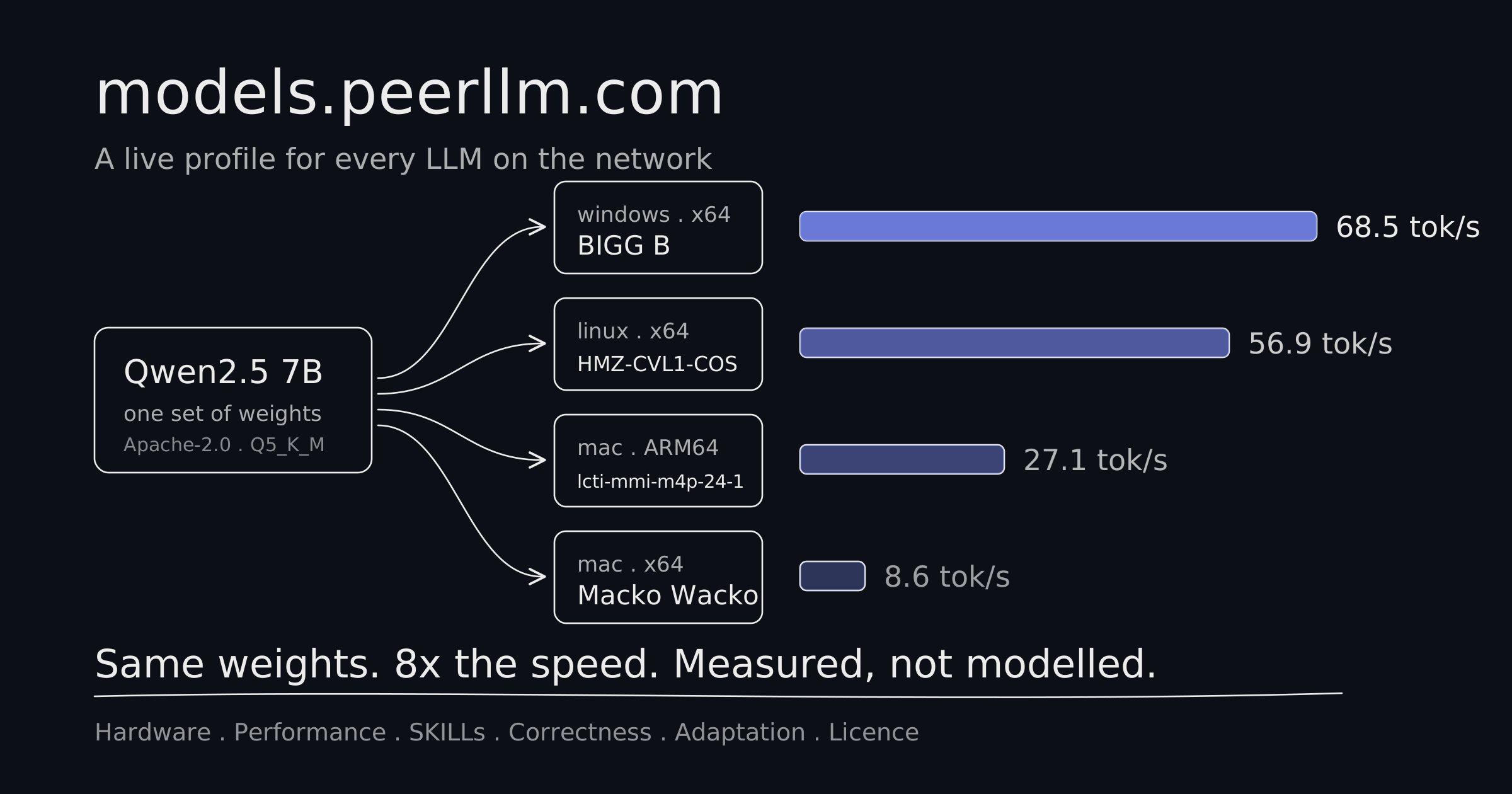
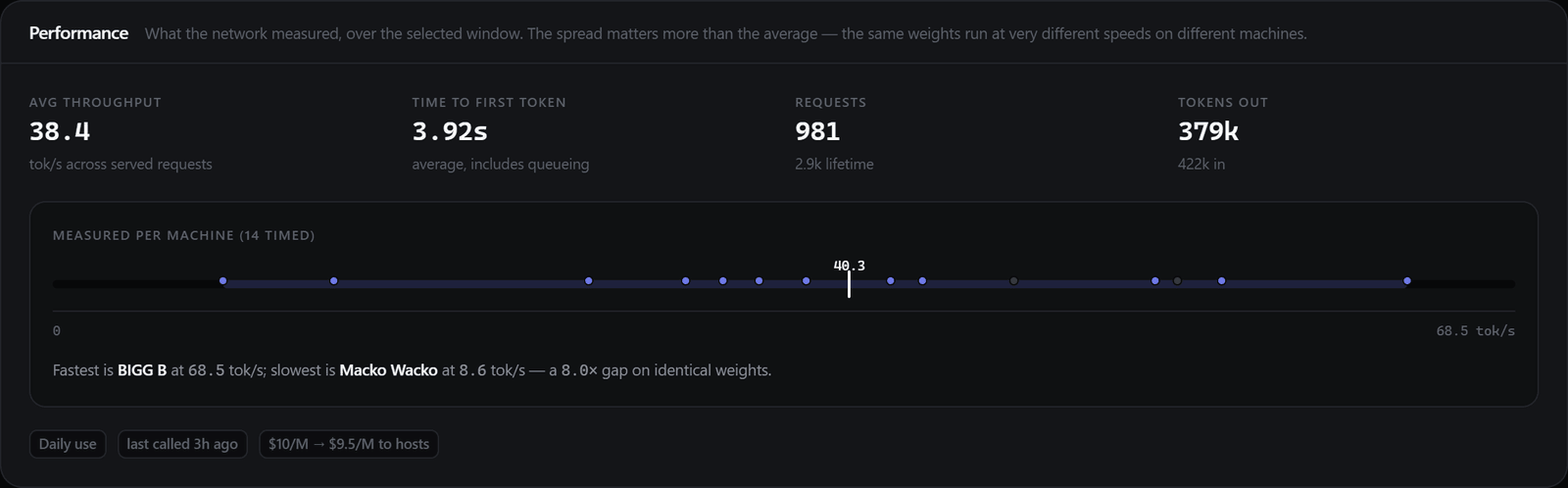
Take Qwen2.5 7B Instruct. One set of weights, one quantisation, fourteen machines timed. The network-wide average is a single tidy figure. The reality:
| Machine | Platform | Measured |
|---|---|---|
| BIGG B | windows . x64 | 68.5 tok/s |
| HMZ-CVL1-COS | linux . x64 | 56.9 tok/s |
| lcti-mmi-m4p-24-1 | mac . ARM64 | 27.1 tok/s |
| Macko Wacko | mac . x64 | 8.6 tok/s |
Eight times the difference, on identical weights. Mistral 7B Instruct v0.3 spans 6.4 to 58.7 tok/s across its machines, better than nine times. Any single average erases that completely, and the average is what every other site would print.
So the site refuses to print one alone. Every throughput figure comes with its spread, its median marked, and the fastest and slowest machines named. On a decentralized network, the question is never “how fast is this model”. It is “how fast is this model where my request lands”, and routing choice matters more than the headline suggests.
4/ SKILLs: Does It Follow Instructions?
This is where the two portals meet.
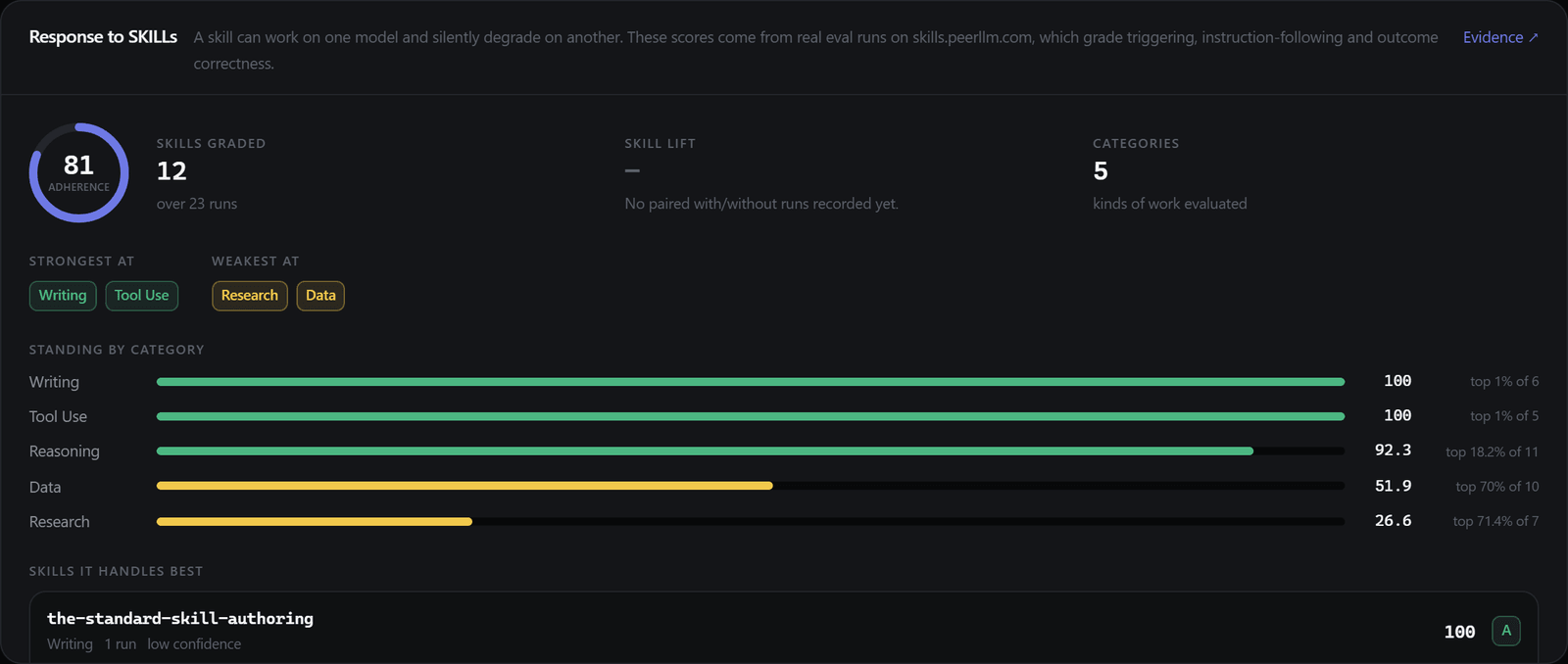
A skill can work perfectly on one model and quietly fall apart on another. SKILLs already measures that, model by model, on real eval runs. So every model profile pulls its skill evidence directly from skills.peerllm.com: how many skills it has been graded on, its mean adherence, and its standing in each category of work against every other model tested there.
The category breakdown is the interesting part, because it is rarely flat. Qwen3 14B scores 100 on writing and 100 on tool use, 92.3 on reasoning, and 26.6 on research. That is not a model that is “good” or “bad”. That is a model with a shape, and knowing the shape tells you which jobs to send it.
5/ Correctness: Three Readings, Never Fused
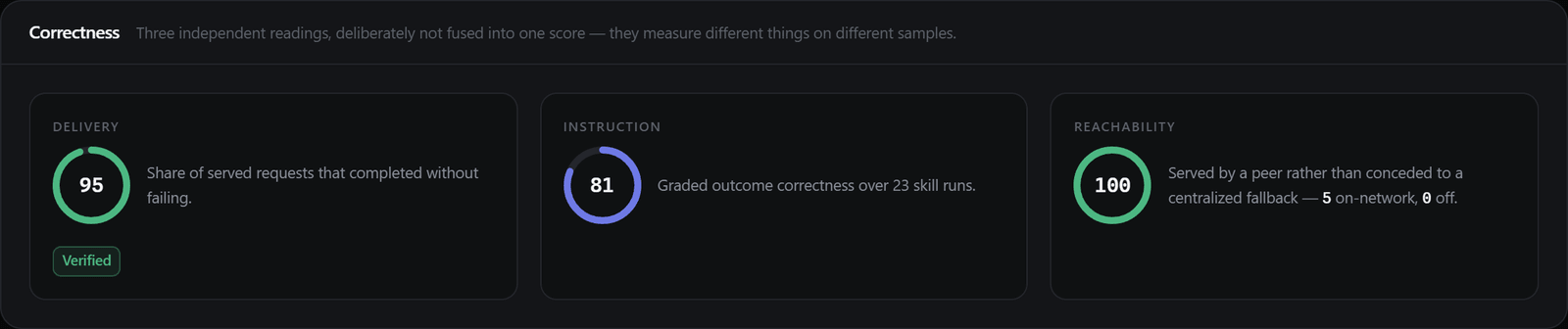
There are three independent ways to ask whether a model gets things right, and they measure different things on different samples:
- Delivery. Of the requests it was given, how many completed without failing.
- Instruction. Graded outcome correctness on real skill runs.
- Reachability. Of the requests users made for it, how many a peer actually served instead of conceding to a centralized fallback.
Every instinct says to average these into one score. We deliberately do not. A composite would hide which of the three is missing, and that is precisely the thing worth knowing: a model with a great success rate that has never been run against a skill is a very different proposition from one that has been graded and passed. They sit side by side, unfused, and any of them can be blank.
6/ Licence: The Part Nobody Publishes
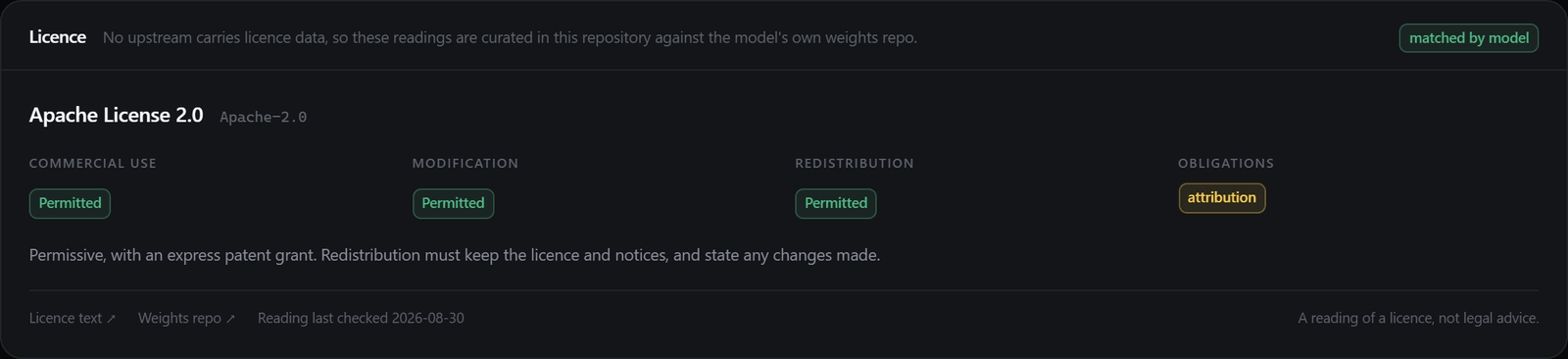
None of our upstreams carry licence data. Not the orchestrator, not the model catalogue. You get the weights repo and nothing about what you may do with the weights.
So this is curated by hand, in the repository, against each model’s own weights repo, and it answers the practical questions directly: commercial use, modification, redistribution, attribution, and any use restrictions that sit alongside the licence rather than inside it.
Three rules keep it honest. Every entry links both the licence text and the weights repo the reading came from. Each one records how it matched, whether by exact model id, by weights repo, or merely by family, and the page marks a family match as the weaker claim it is. And a model we do not recognise returns nothing at all. “Not yet curated” is a real answer; inventing a permissive licence over unknown weights is a liability.
It is a reading of a licence, not legal advice, and the page says so.
7/ Can My Machine Run This?
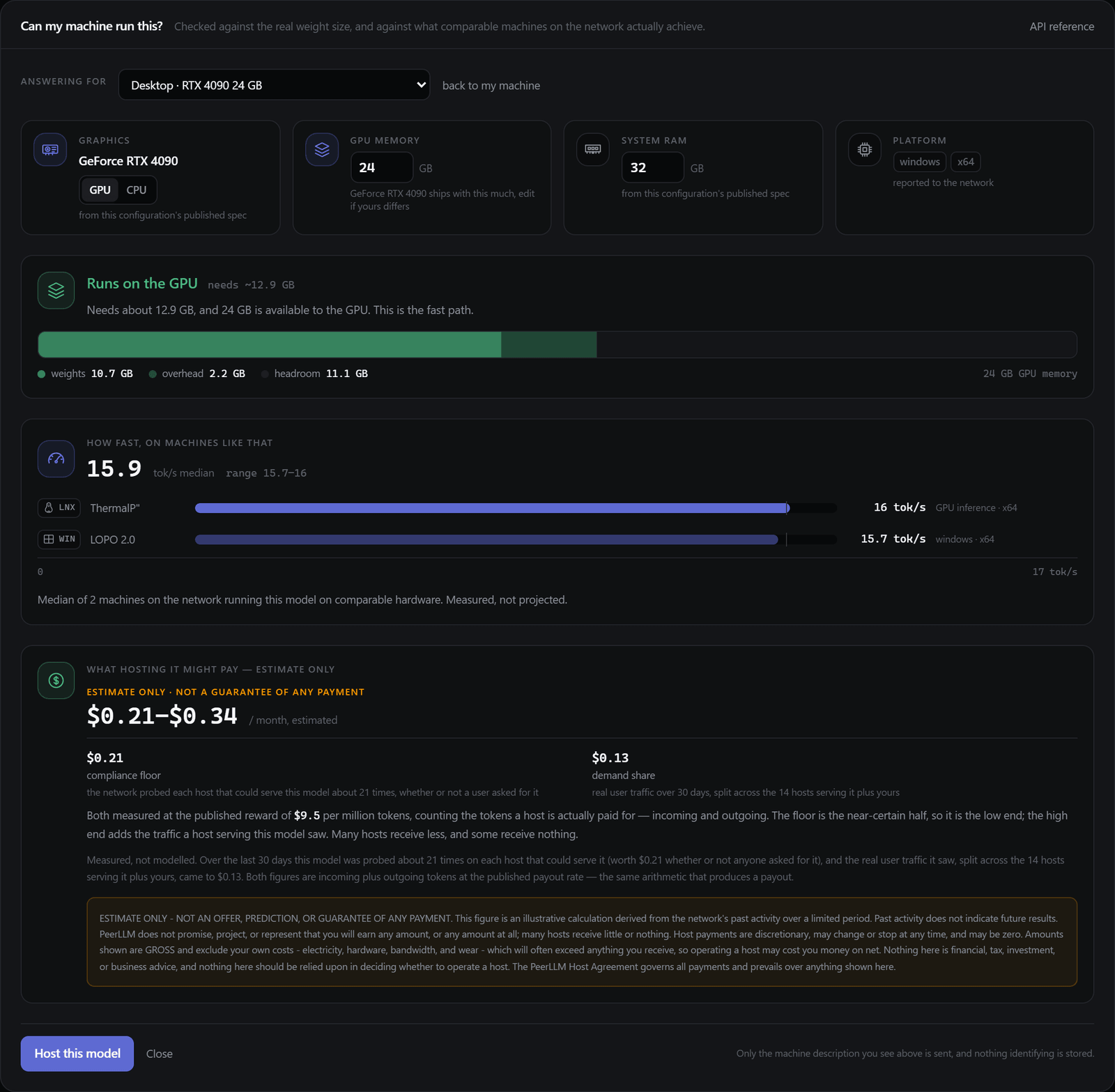
The question most people actually arrive with. There is a button for it on every profile, and it answers three things in descending order of confidence.
Will it fit is arithmetic: the real weight size against your memory, with the working set drawn to scale so you can see the headroom rather than read about it.
How fast is the part I am proudest of, because it is not a formula. The network has already timed this model on real machines. So we find the ones most like yours and report what they actually get. If nothing on the fleet resembles your machine, the site says so and gives you no number, rather than modelling one.
What it earns has two halves that behave nothing alike. The network probes every machine it trusts on a cadence, so a host is paid for being able to serve a model whether or not a user ever asks for it. That is the floor, and it is the half a prospective host actually controls, because it scales with how many models the machine can hold rather than with anyone’s demand. On top of it sits a share of the real traffic that model saw, divided across the hosts serving it plus yours. Both halves are counted from incoming plus outgoing tokens at the published payout rate, which is the same arithmetic that settles a payout rather than a model of one. The site shows the range and never the midpoint alone, because the gap between a quiet machine and a busy one is the most useful thing a prospective host can be told. It is still an estimate, and it is labelled one.
Your browser will tell us a surprising amount: your GPU’s name, your core count, your platform. It will not tell us your VRAM, ever, because no browser API exposes it; it is withheld as a fingerprinting signal. But a card’s memory configuration is public knowledge, so we look it up from the name. Everything detected is editable, everything says where its number came from, and none of it leaves your browser.
You can also point the check at a machine that is not yours: a configuration you are considering, or any machine already on the network. Pick one of those and the speed answer stops being an inference from lookalikes and becomes a direct reading, which the page marks as measured, not inferred.
8/ Why This Only Works on a Real Network
Every one of these figures exists because there is a live, heterogeneous fleet underneath: 19 machines across macOS, Windows and Linux, on ARM64 and x64, from a 16GB mini PC to a 192GB workstation, running 12 distinct models between them.
You cannot discover an eight times throughput spread on a homogeneous cloud, because there isn’t one. You cannot report which machines have a model warm if you own all the machines. The decentralized fleet is not a constraint we are working around here. It is the instrument that makes the measurement possible.
9/ Have a Look
models.peerllm.com is live now. Every model on the network has a profile, every profile is built from measurements taken minutes ago, and everything blank is blank on purpose.
If you have a machine sitting idle, open any model and press Can my machine run this?. It will tell you honestly whether the thing fits, roughly how fast it will go based on machines like yours, and what it might earn. If the answer is no, it says no.
PeerLLM is experimental software provided as is. Figures quoted in this post were measured on the live network on 30 August 2026, re-checked on 31 August, and will have changed by the time you read it; the site shows current values. Model and product names referenced here belong to their respective owners and are mentioned only to identify which models the network serves; their mention does not imply affiliation or endorsement. Licence summaries on the site are readings of published licence terms, not legal advice.
Hassan