
PeerLLM v2.16.0 Advanced Server Options: The Limits Your API Runs Under, Where You Can See Them
Every server runs under limits. How much conversation it can hold in mind at once. How long it will let a model deliberate. What it assumes when a request doesn’t say.
PeerLLM’s local server has always had those limits. You just couldn’t see them, and you couldn’t change them. They were numbers chosen once, compiled in, and never mentioned again.
v2.16.0 brings them out where you can look at them — and, if you want to, turn them.
The reason this became urgent is a bug I want to describe honestly, because it is the most interesting kind: the kind that looks exactly like success.
0/ The Model That Thought Itself Out of an Answer
Reasoning models — Qwen3, gpt-oss, and the growing family like them — do something new. Before they answer, they think, and that thinking is made of tokens just like the answer is.
Now consider how a request is bounded. You send max_tokens, and that number caps the whole generation: the thinking and the answer, together, out of one budget.
So here is what could happen. A prompt provokes a long deliberation. The model thinks. It thinks carefully, at length, well — and it uses the entire budget doing it. Then it hits the ceiling, and stops, with nothing left to say the answer with.
What comes back is an HTTP 200. A perfectly successful response. Zero visible tokens in it.
That is a horrible failure to debug, because nothing anywhere reports a problem. Your client says success. The logs say success. The host says it served a request. The only thing wrong is that the answer is empty, and the reason is invisible.
The cause turned out to be a default nobody had reason to look at. The underlying engine budgets thinking as a fraction of the context window — 75% of it, or half when the window is small. At a typical window that’s thousands of tokens of thinking allowed. Set against a request asking for a few hundred tokens of reply, the thinking budget was never the binding constraint. max_tokens was. And thinking ate it whole.
So v2.16.0 adds a thinking budget you can actually set. Give a model 512 tokens to reason with and it reasons, then answers. The difference in practice is stark: the same prompt that returned nothing comes back with a complete, well-argued response, and the engine’s own stop reason changes from “ran out of budget” to “finished.”
A little reasoning helps. Unbounded reasoning is fatal. Now that’s a dial and not a fixed assumption.
1/ Advanced Options, on the Server Page
The dial lives with the others, on the Server page — the same screen where you start and stop the server — behind a Show advanced options switch.
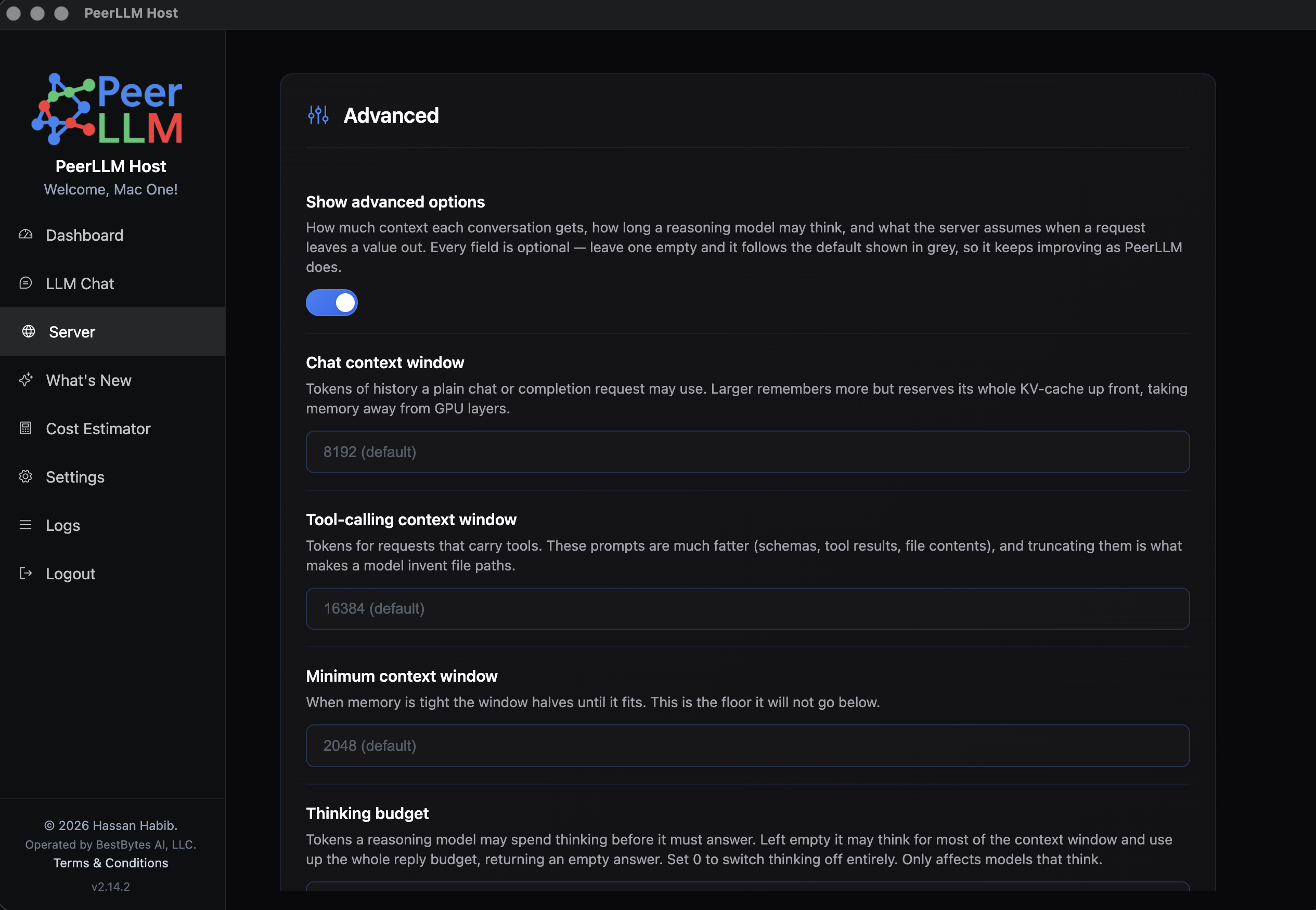
Eight settings, in plain language:
- Chat context window (8192) and Tool-calling context window (16384) — how much conversation a request can hold in mind. Requests carrying tools bring far fatter prompts (tool schemas, tool results, file contents), so they get the larger window. This split is deliberate: plain chat keeps the smaller one, which frees memory back to your GPU.
- Minimum context window (2048) — when memory gets tight the window halves until it fits. This is the floor it won’t go below.
- Thinking budget — the dial from the section above. Set 0 to switch thinking off entirely.
- Default reply length (512) and Default temperature (0.7) — what the server assumes when a request doesn’t say. A request that does say always wins; these are defaults, never caps.
- Concurrent conversations (10) — how many conversations one model keeps alive at once.
- Unload model after (10 minutes) — idle time before the model is released and its memory freed.
Every one of them was already there, deciding how your server behaved. The only thing that changed is that you can see them.
2/ Empty Means Default, and That’s a Promise
Look closely at that screenshot: every field is empty, with its default sitting behind it in grey.
That’s not a form waiting to be filled in. It’s the design.
An empty field means follow the default — and the default is whatever ships with PeerLLM today. When we learn something and improve that number in a future release, a field you never touched picks up the improvement automatically. It keeps getting better without you doing anything.
The tempting shortcut would have been to write the current defaults into your configuration the first time you opened the page. It would look identical. But it would quietly pin your host to the numbers that happened to be current on the day you first got curious, forever, and you’d never know it happened. That’s the opposite of what a settings page should do to someone who just wanted to look.
So PeerLLM writes down only what you actually changed. Clear a field and the setting is removed, not reset to today’s number — it goes back to following the product. Reset to defaults does that for all eight at once.
3/ The Same Settings on the Command Line
Headless hosts get the same eight settings, plus something the desktop can’t easily show: where each value came from.
$ peerllm-host rest advanced

Advanced serving knobs (env > config > default)

  Chat context        : 16384 (from config)
                        KV window for plain chat/completions
  Agentic context     : 16384 (default)
                        KV window for tool-calling turns
  Min context         : 2048 (default)
                        floor when memory is tight
  Thought budget      : 512 (from config)
                        reasoning cap; 0 disables thinking
  Default max_tokens  : 2048 (from PEERLLM_REST_MAX_TOKENS)
                        when the caller omits it
  Default temperature : 0.7 (default)
                        when the caller omits it
That third column matters more than it looks. Environment variables override configuration files, which is exactly what you want on a fleet — but it also means a value you set can be quietly outranked by one you forgot you exported. So the CLI says which of the three is actually winning, per setting. “I set that, why isn’t it taking effect?” is answered by reading one line instead of reading source code.
Setting one is what you’d expect:
$ peerllm-host config set chatContextSize 16384
$ peerllm-host config unset chatContextSize
That second command exists because of the promise in the previous section. Without a way to unset, choosing a value once would be permanent — you could never get back to following the default. A setting you can’t un-set isn’t really a setting.
4/ One Configuration, Both Hosts
The desktop app and the command-line host read the same configuration file. They always have.
So this isn’t two features that resemble each other. Set the thinking budget in the app on your workstation and the CLI honors it. Set a context window with config set on a headless box and the app’s Server page shows it. One place, both hosts, no synchronizing.
There’s a boundary worth naming: these settings govern what your machine serves. When your local server relays a request out to the decentralized network — Hybrid Mode, from v2.7.0 — your local limits don’t travel with it. That request is served by someone else’s hardware under the network’s rules. Your host is not an authority over work it’s only passing through.
Also in This Release
- A request sending
nullno longer skipped your defaults. Several OpenAI client libraries sendnullfor an optional value they aren’t setting, rather than omitting it. PeerLLM treated that as a real value instead of “not set,” so those requests slipped past the configured default. That was harmless when the default was an invisible constant. The moment it became a setting you could deliberately choose, it became a promise being broken for exactly the clients most likely to rely on it. Fixed on both hosts, and on both endpoints.
Why This Release Matters
There’s a kind of software that decides things on your behalf and never tells you what it decided. It usually decides fine. And when it doesn’t, you’re left staring at a result that makes no sense with no thread to pull.
The empty answer was that, exactly. Nothing was broken in any way a machine could detect. A model deliberated within its budget and stopped when it hit the ceiling — every component behaving correctly, and the whole thing useless. It took measuring the same prompt against different thinking budgets to see it at all.
PeerLLM’s whole premise is that you should own your AI infrastructure rather than rent it from someone who won’t tell you how it works. Owning it has to mean more than the hardware sitting in your room. It means the thing is legible: you can see what it decided, you can see why, and you can decide differently.
Eight numbers moved from compiled-in to visible. Every one of them shows its default, says where its value came from, and goes back to following the product the moment you clear it.
You could already run PeerLLM without asking anyone’s permission. Now you can see what it’s doing while it runs.
Download PeerLLM today from the download section at hosts.peerllm.com, or update your headless hosts with npm install -g peerllm-host-cli@latest.
~ Hassan