PeerLLM v1.8.0: Desktop Host, Host CLI, Portal Chat, and the Road to JooMMA
PeerLLM v1.8.0 is another important step toward making decentralized AI practical, reliable, and accessible for ordinary people. Every release moves us closer to a network where people can contribute their machines, serve AI workloads, understand their estimated rewards, model their operating costs, and interact with the network directly from the tools they already understand.
This release is not only about adding more buttons, screens, or small user interface improvements. It is about making the PeerLLM network feel more complete and more real. Hosts need better visibility into what their machines are doing. Users need a clearer way to interact with the network. Operators need better reliability when things go wrong. And the overall system needs to keep moving toward a future where distributed AI is not just technically possible, but useful, safe, understandable, and economically viable.
There are three major areas in this release. First, PeerLLM Desktop Host v1.8.0 improves the experience for people running PeerLLM from the desktop application. Second, PeerLLM Host CLI v1.8.0 improves the command-line experience for servers, Docker containers, headless machines, and non-GUI environments. Third, the PeerLLM Host Portal now gives users better visibility into all of their hosts and introduces the ability to chat with the PeerLLM network directly from the web.
This release cycle also makes the road toward JooMMA clearer. JooMMA is planned to come with PeerLLM v2.0.0 soon, and it represents the next major phase of how PeerLLM will reason about routing, orchestration, task execution, network intelligence, and the future of distributed AI.
0/ PeerLLM Desktop Host v1.8.0
PeerLLM Desktop Host is still the easiest way for everyday people to join the network. The desktop application is designed for users who do not want to manage servers, write scripts, or understand every technical detail of distributed inference. They should be able to install the app, connect their machine, understand what is happening, and participate in the network with confidence.
Version 1.8.0 focuses heavily on reliability, visibility, and host trust. A host application should not feel fragile or mysterious. If something is downloading, the user should be able to see it. If something fails, the application should recover cleanly. If a user wants to understand whether running a host makes economic sense, the system should give them a reasonable way to estimate that instead of leaving them guessing.
One of the biggest improvements in the desktop application is the way model downloads are handled. Previously, a model could appear as installed while it was still downloading, because the application saw the partially written .gguf file and treated it as complete. That could create confusion because the user might think the model was ready even though the file was still being written. In v1.8.0, downloads are tracked by the main process as the source of truth. Models now download into a .partial file first, and they are only renamed to .gguf after the download completes successfully.
This makes the installed state much more honest and reliable. The app can also show download progress globally, not only inside the modal that started the download. A user can close the model dialog, return later, and still see the real download state. The dashboard can now show an active model download as a first-class entry in the Available LLMs list, with live progress and a cancel button. If the user cancels the download, the application stops the transfer, cleans up the partial file, and returns the model back to a normal downloadable state.
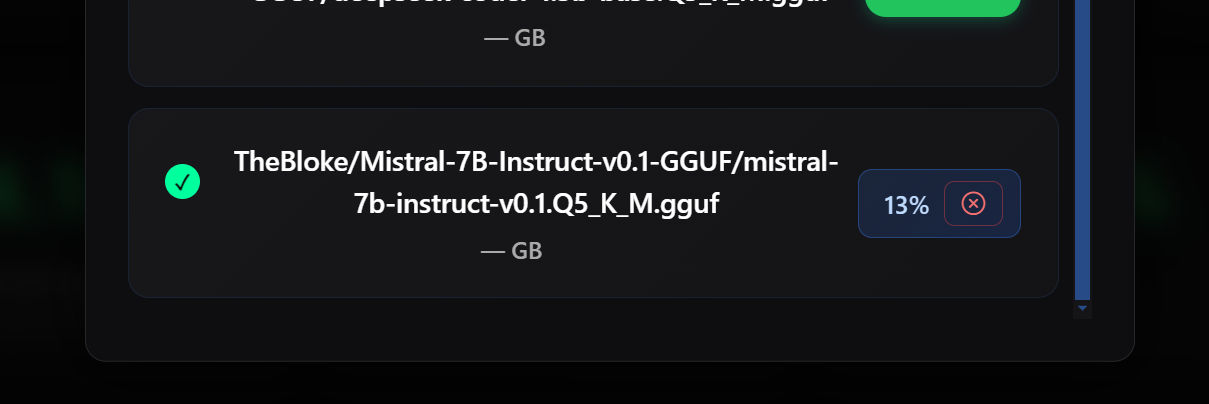
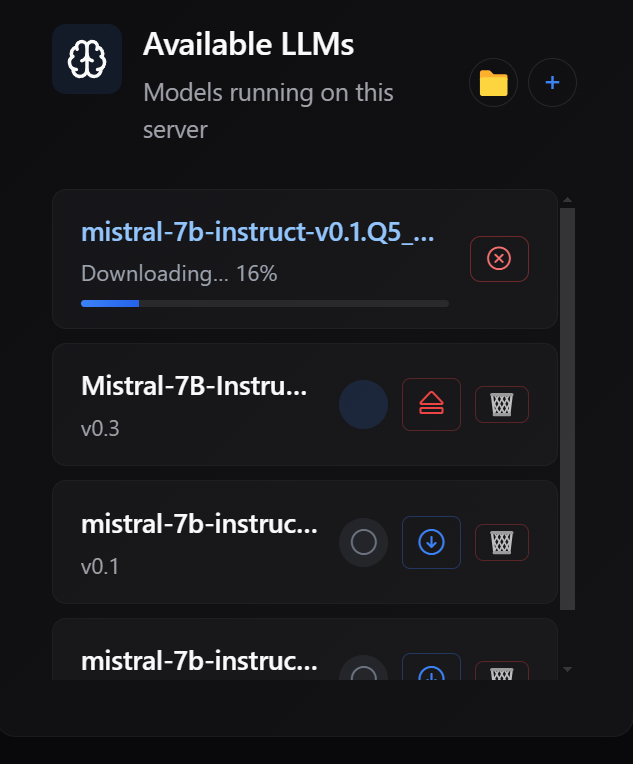
This also improves shutdown behavior. If the user quits the desktop app while a model download is still active, the app now cancels the active download cleanly instead of allowing native errors, stack traces, or broken partial files to appear after the window is already gone. That kind of detail matters because PeerLLM is asking people to trust the software on their own machines, and that trust has to be earned through stability, clarity, and respect for the user’s system.
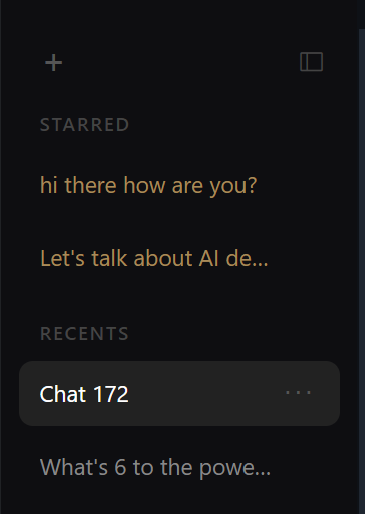
The desktop chat experience also received important usability improvements. New chats now appear at the top of the recent list instead of the bottom, which makes the chat history feel more natural and easier to use. The new chat button now stays pinned at the top of the sidebar instead of scrolling away as more conversations accumulate. This makes the local chat experience feel cleaner and more intentional.
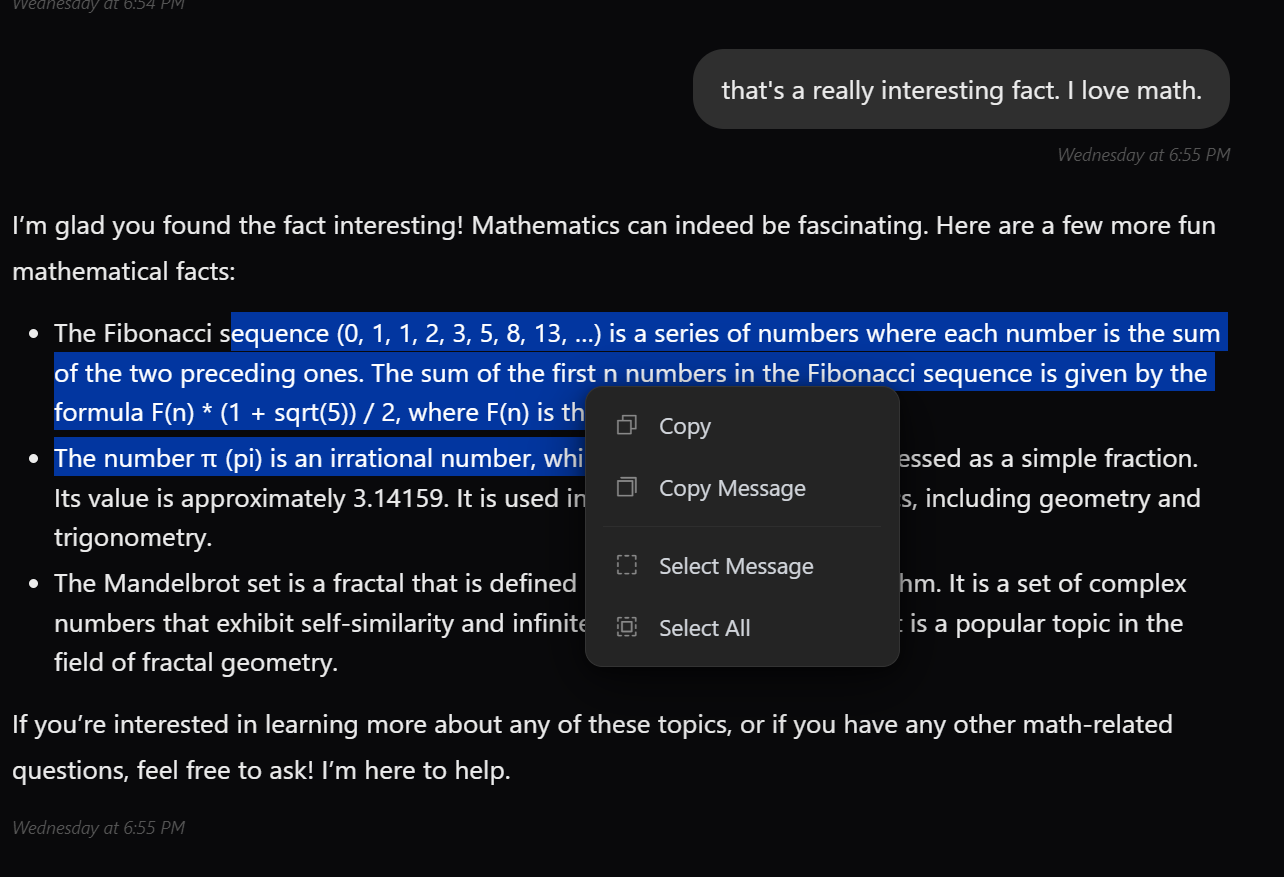
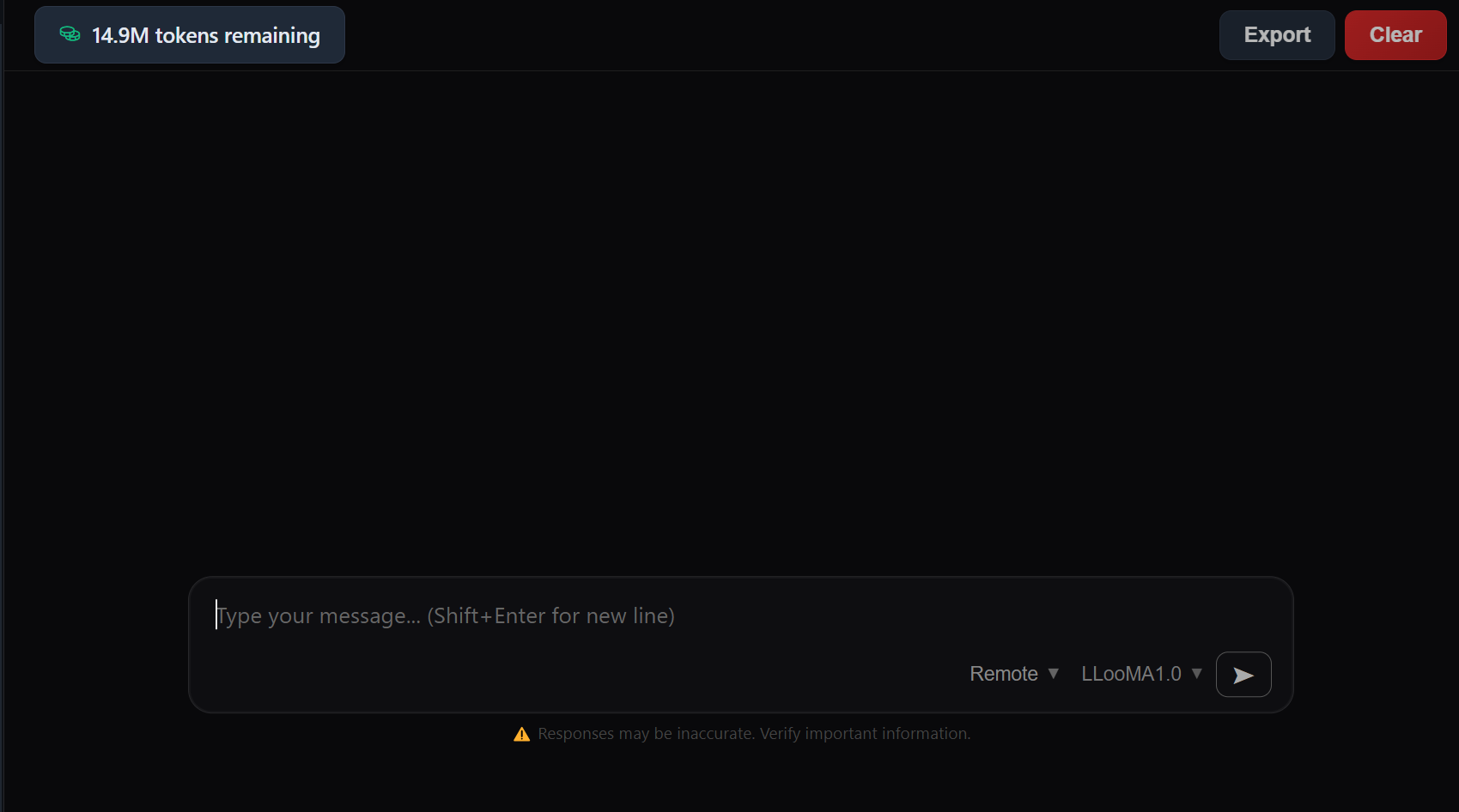
The desktop app also includes improvements around chat interaction. The release includes work around chat context actions such as copying, selecting, and pasting text. It also includes token balance visibility in the chat window and clearer guidance when a user selects Remote mode without an API key. These details may sound small individually, but together they make the application feel more complete, more usable, and easier to understand.
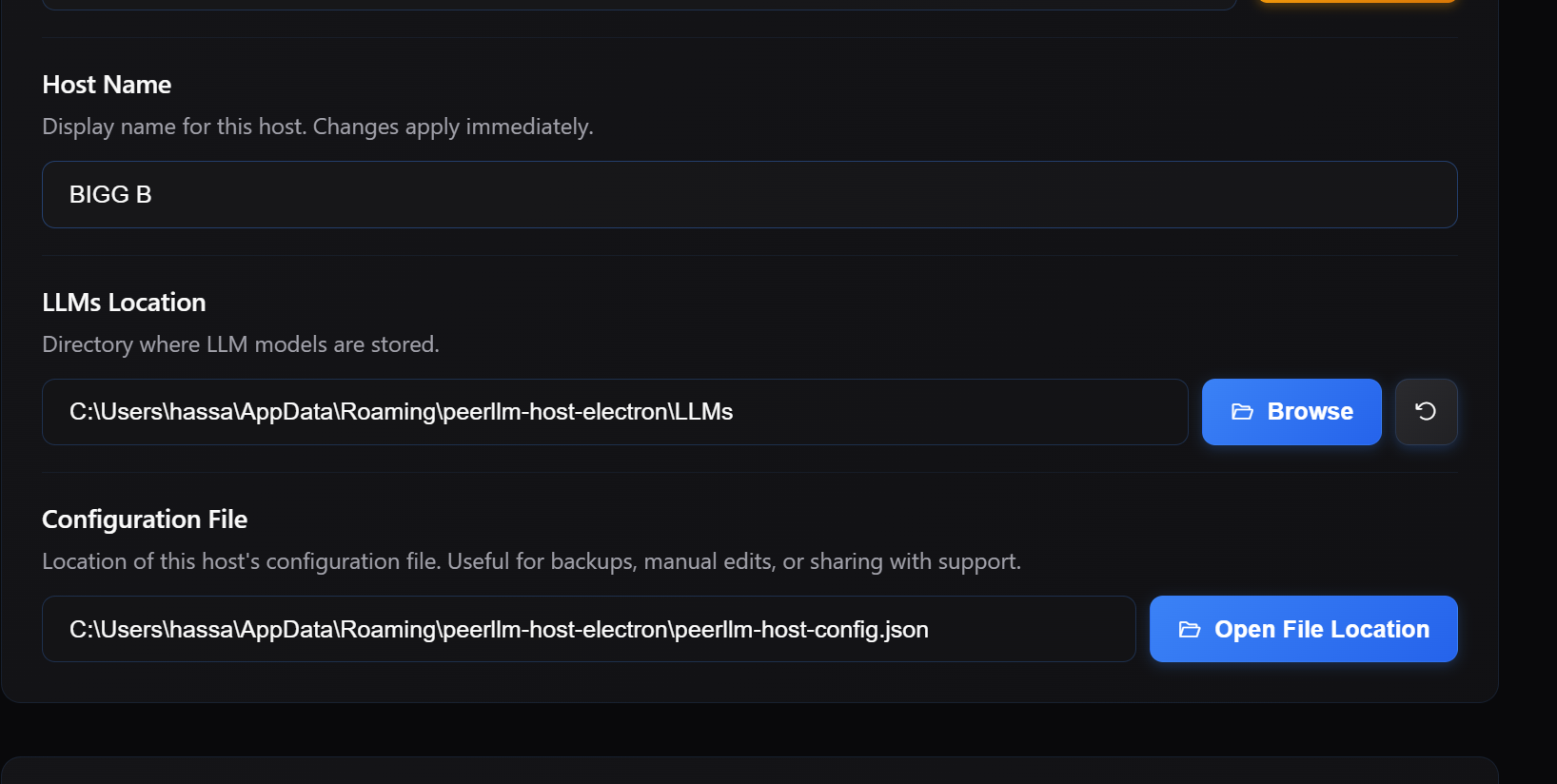
Several users asked for an easier way to locate the PeerLLM configuration file. The most common reason was migration: someone running the desktop app wanted to move to the CLI on a server or headless machine and did not want to go through the full host setup process again. The configuration file already contains everything the host needs, including its identity and registration with the network, so being able to find and copy it is a practical shortcut. In v1.8.0, the Settings page includes a button that opens the configuration file location directly in the operating system file manager, so users can find, copy, or inspect their config without having to hunt through application directories.
Another major addition is the Host Cost Estimator. This is one of the most important host-facing features in this release because PeerLLM is not only asking people to contribute compute. PeerLLM should also help hosts understand what participation may cost them. A host machine consumes electricity, uses internet resources, and experiences wear and tear over time. If someone is going to keep a machine online for the network, they deserve tools that help them think clearly about whether that specific machine makes sense for them.
The Cost Estimator lives in its own page in the left-side navigation, separate from the dashboard. It is scoped to the current machine only, and it does not ask the user to choose from all hosts on the account. When the page opens, it fetches this host’s estimated earnings from the API so that the estimate reflects the current machine instead of showing only an account-level total across all hosts.
The estimator lets the host enter assumptions for electricity cost, internet cost, and wear and tear. Electricity is estimated from watts, hours per day, dollars per kilowatt-hour, and number of days. Internet cost is estimated from monthly internet cost, the host’s share of that usage, and the number of days. Wear and tear is estimated from machine value, expected life in months, the host’s share of the machine usage, and the number of days. The summary then shows the estimated line items, total operating cost, and whether the current assumptions produce estimated net profit, estimated net loss, or break even.
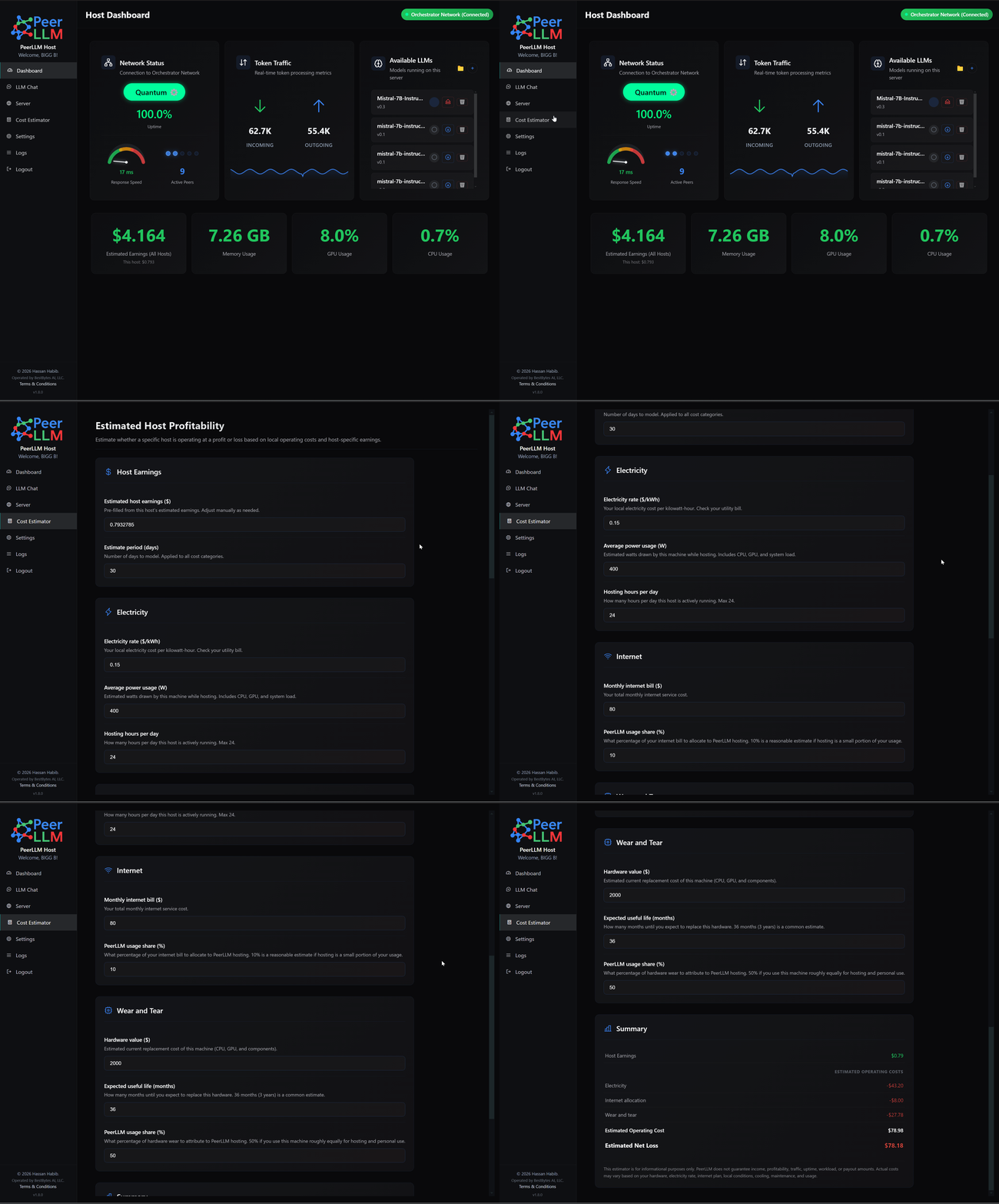
The wording in this feature is intentionally estimate-based. It does not say PeerLLM is deducting costs. It does not say anything is guaranteed. It does not say that estimated earnings are final. It simply gives hosts a practical way to compare possible operating costs against this host’s estimated rewards. A desktop GPU, a laptop, a server in a closet, and a cloud instance may all have different economics, and PeerLLM should help hosts reason about those differences clearly.
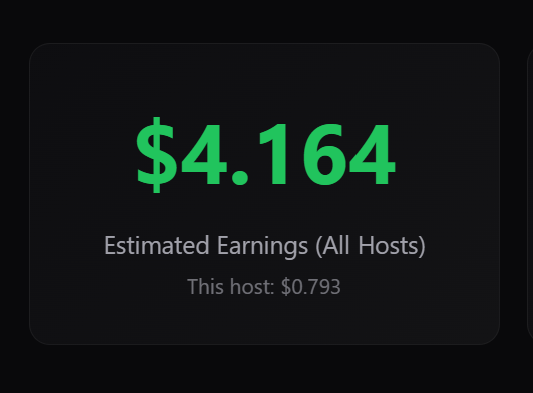
The desktop dashboard also makes the distinction between account-level estimated earnings and this host’s estimated earnings clearer. The account-level value is shown as the primary number, while this host’s estimated earnings appear as a secondary line underneath. That distinction matters because a user may operate multiple machines, and they need to understand what each machine is doing without confusing one host’s performance with the whole account.
1/ PeerLLM Host CLI v1.8.0
PeerLLM is not only a desktop application. The network also needs to run where serious compute often lives, including servers, Docker containers, headless Linux machines, remote environments, and systems where a graphical interface is not available. That is why PeerLLM Host CLI v1.8.0 is such an important part of this release.
The CLI makes it possible to operate a full PeerLLM host experience from the command line. This is especially useful for users who want to run PeerLLM inside Docker containers, on remote servers, on machines without displays, or in environments where automation and scripting matter more than a desktop user interface. If PeerLLM is going to become a real distributed AI network, it has to support both everyday desktop users and more technical operators running infrastructure at scale.
To install the CLI on Linux or macOS:
npm i -g peerllm-host-cli
On some systems you may need elevated permissions:
sudo npm i -g peerllm-host-cli
The same command upgrades an existing installation to the latest version. The package is published at npmjs.com/package/peerllm-host-cli.
Once installed, you can explore all available commands by running:
peerllm-host help
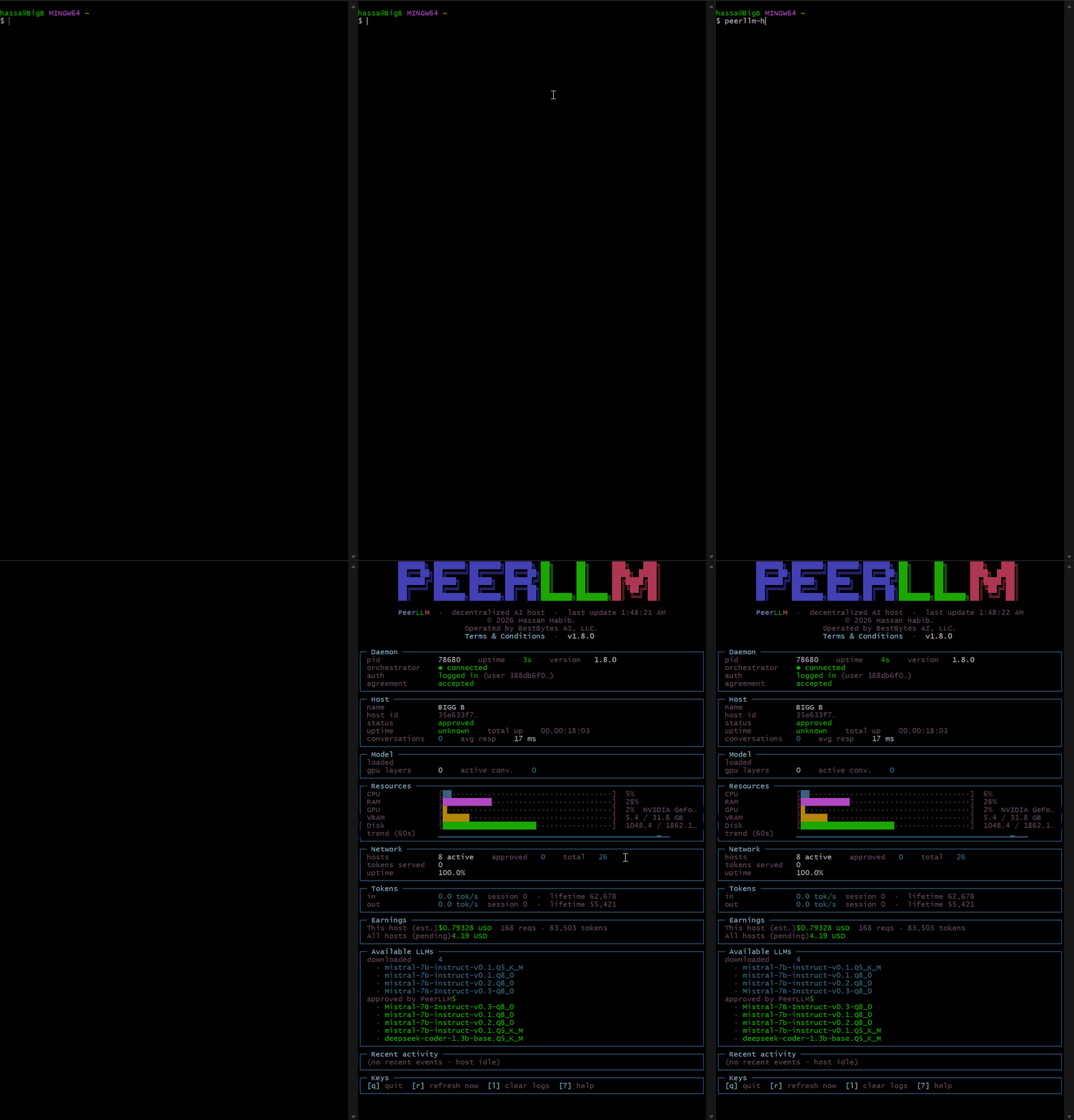
One of the biggest improvements in the CLI is friendlier system error handling. Instead of exposing raw Node.js stack traces for common machine-level problems, the CLI and daemon now surface human-readable guidance for errors such as running out of disk space, permission denied, too many open files, port already in use, network resolution problems, and several other system-level failures.
This matters because a raw stack trace may be useful to an engineer, but it is not useful to someone who just wants to know why their host stopped working. A clear message like “Out of disk space,” followed by practical next steps, is much better than a long exception that only tells the user something went wrong. PeerLLM should help the user recover, not make them feel like the system is speaking a language only developers can understand.
The CLI now has centralized friendly error formatting, global crash handlers, and better logger behavior. If the log file write fails, the daemon can now fall back to stderr instead of crashing because of an unhandled stream error. Model download errors are also classified more accurately, so an out-of-disk-space problem during a download is treated like an actual storage problem instead of being hidden under a generic network error. These are the kinds of fixes that make the software more stable in the real world.
The CLI dashboard also improves GPU utilization visibility. Previously, GPU utilization often appeared as unavailable on macOS and many Linux machines because the system information library did not reliably expose GPU usage outside of certain Windows or NVIDIA environments. The new implementation adds platform-specific fallback sampling. On macOS, it can parse GPU utilization from system data without requiring sudo. On Linux, it can try nvidia-smi and then fall back to DRM GPU busy percentage paths when available.
This makes the CLI dashboard more useful across more machines. Hosts should be able to understand what their hardware is doing, especially when the network depends on the availability and performance of distributed machines. Even when the value is not available on every possible system, PeerLLM should try harder to show useful information instead of stopping at the first unavailable metric.
Another improvement is the Available LLMs panel. The CLI now more clearly distinguishes between models downloaded on the host machine and models approved by PeerLLM in the network-wide catalog. Previously, the local count could be wrong when the user had overridden the LLM location, and the approved list could look like a duplicate of the downloaded list. That made it harder for hosts to understand what was actually installed locally versus what the network recognized as approved.
In v1.8.0, the downloaded row now reflects the daemon’s actual model state, including any custom LLM location. The approved-by-PeerLLM row now represents the network-wide approved catalog instead of echoing the host’s submitted capabilities back to the dashboard. This makes the panel more meaningful because users can better understand what they have on their machine and what models are part of the broader PeerLLM-approved catalog.
The CLI also now checks for new versions more frequently and makes update availability harder to miss. Instead of polling every twelve hours, the version service now checks hourly. The dashboard also shows a more prominent update callout when a newer version is available, and the daemon panel makes the update indicator clearer. This matters because PeerLLM is evolving quickly, and hosts need to stay current as the network continues to improve.
A host that runs old software for too long may miss reliability improvements, protocol changes, payment-related changes, model handling fixes, and important network behavior updates. Making updates more visible is part of keeping the network healthy. In a decentralized system, the network is only as strong as the machines participating in it, and those machines need a clear path to stay updated.
2/ Chat Capability in the Host Portal
The PeerLLM Host Portal is also becoming more useful. Users can now see all of their hosts in the portal, along with estimated rewards or earnings per host. This gives operators a clearer view of how their machines are performing across the network. If someone runs multiple hosts, they should not have to guess which machine is contributing, which one is idle, or which one is generating the most estimated rewards.
This matters because PeerLLM is not only about connecting a machine once and forgetting about it. Hosts need visibility. They need to understand what is happening across their machines. They need to see which hosts are online, which hosts are performing, and how estimated rewards are distributed across the machines they operate. Better host visibility makes the network easier to trust and easier to manage.
Even more importantly, users can now chat with the PeerLLM network directly from the web portal. This is a big step because PeerLLM is not only about hosting. It is also about usage. The same network that people contribute to should also be available for people to interact with. The portal chat capability helps close that loop by allowing users to manage hosts and use the network from the same web experience.
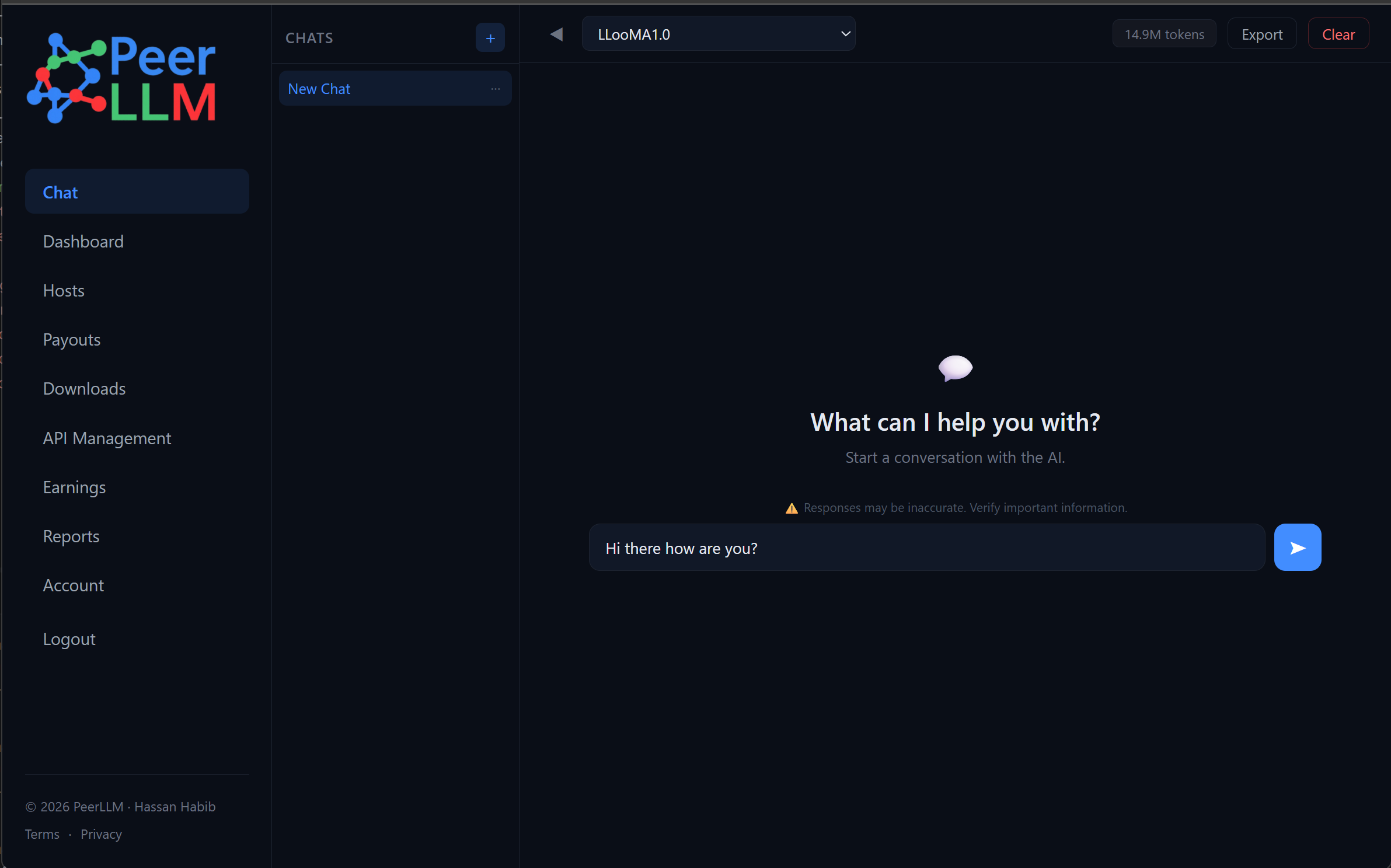
This also sets the stage for the mobile experience that is coming soon. The goal is simple: users should eventually be able to manage and check all of their hosts from their phone. They should be able to see whether their machines are online, review estimated rewards, monitor health, and chat with the PeerLLM network from anywhere. PeerLLM should not require people to sit in front of a desktop dashboard to understand what their machines are doing.
The future PeerLLM mobile experience may become one of the most important ways people interact with the network. Hosts could check status from their phone, users could chat with the network from their phone, and operators could receive better visibility into the health of their machines. PeerLLM should become something people can carry with them, not only something running in the background on a computer.
Network Testing, Monitoring, and Health
Behind the scenes, PeerLLM is going through heavy testing. This is not just about whether a single host can run a model. The bigger question is whether the network can keep working as more hosts join, more requests flow through the system, more models are added, and more real-world machine conditions appear.
A decentralized AI network has to handle machines that are fast, slow, busy, misconfigured, offline, overloaded, underpowered, or temporarily unavailable. It has to route traffic intelligently. It has to monitor health. It has to measure reliability. It has to understand which hosts are actually serving traffic well and which hosts need attention.
That is why we are putting more effort into monitoring traffic, network health, host behavior, and total tokens served across the network. These metrics matter because they help us understand whether PeerLLM is becoming more reliable over time. They also help us understand where the network needs more capacity, where hosts may need better guidance, and where the orchestration layer needs to become smarter.
So far, PeerLLM has served 3 million+ tokens across the network. That number matters because every token represents the network doing what it was built to do. It represents a prompt moving through PeerLLM, a host participating, and the system proving that decentralized AI can move from theory into practice.
We are still early, but the direction is becoming clearer. PeerLLM is no longer just a desktop host, a CLI, or a portal. It is becoming an operating network. The more we test it, monitor it, and improve it, the closer we get to a decentralized AI system that can serve real users reliably.
The Road to JooMMA in PeerLLM v2.0.0
The next major step is JooMMA. JooMMA is the knowledge layer of PeerLLM. While LLooMA handles the compute side — routing AI inference across the decentralized host network — JooMMA handles the knowledge side. It retrieves verified, contributor-attributed knowledge shards at inference time, and when a shard helps ground an answer, the expert who created it gets paid. You can read the full introduction to JooMMA here.
JooMMA is planned for PeerLLM v2.0.0, and it represents a larger shift in how the network thinks, routes, coordinates, and executes work.
PeerLLM started with a simple but powerful idea: ordinary people should be able to contribute compute to an AI network and participate in the value that network creates. That idea is still the heart of the project. But as the network grows, the challenge becomes more complex. It is not enough to send prompts to machines. The system needs to understand the network. It needs to understand host capability, model availability, latency, reliability, cost, health, and the shape of the request itself.
That is where JooMMA comes in. JooMMA is part of the next orchestration layer for PeerLLM. The goal is to make the network smarter about how it uses distributed compute. Instead of treating every request as a simple one-to-one call, the network can begin moving toward richer task planning, better routing decisions, stronger fallback behavior, and more intelligent use of available hosts.
This is where PeerLLM starts becoming more than a marketplace of machines. It becomes a living AI network with coordination, routing, memory of performance, and a deeper understanding of how to use the machines connected to it. The future of distributed AI is not only about having many machines. It is about knowing how to use those machines together in a way that produces reliable, useful, and timely results.
In the next few sprints, I will start rolling JooMMA into the PeerLLM network. This will be one of the most important phases of the project so far. It will help move PeerLLM from simple distributed hosting toward intelligent distributed AI orchestration. That shift matters because the long-term goal is not only to decentralize compute, but to build an AI network that can coordinate distributed intelligence in a practical way.
Why This Release Matters
PeerLLM v1.8.0 matters because it improves the practical foundation of the network. The desktop host is becoming more reliable and easier to understand. The command-line host is becoming stronger for servers, containers, and non-GUI environments. The portal is becoming a place where users can both manage hosts and chat with the network. The Cost Estimator helps hosts think more clearly about the economics of running their machines. The network monitoring and testing work helps us understand how PeerLLM behaves under real conditions.
These improvements may not all look dramatic from the outside, but they are the kind of improvements that make a network stronger. A decentralized AI network cannot be built only with vision. It has to be built with operational details, better error handling, better visibility, better host management, clearer economics, stronger update paths, and more ways for users to interact with the system.
I have always believed that AI should not become a future where a few centralized companies own the intelligence, own the infrastructure, own the data, and sell everything back to the people who made it possible. PeerLLM is my attempt to build a different kind of AI network, one where people are not pushed to the edge of the economy while their machines, data, and effort create value for someone else.
PeerLLM is being built for a future where ordinary people can participate, where compute can come from the edge, and where AI infrastructure becomes more open, more distributed, and more human. This is still early, and there are still hard problems ahead, but every release makes the vision more real.
PeerLLM v1.8.0 is another step forward in that direction. It strengthens the desktop host, improves the command-line host, brings chat into the portal, gives hosts better visibility into their estimated rewards and operating costs, and prepares the network for the next major phase with JooMMA in v2.0.0.
Download PeerLLM today from the download section at hosts.peerllm.com.